Pay with USDC
Pay with USDC lets you purchase Auto Drive storage credits with USDC on Ethereum mainnet — no intermediary, no grant form, no approval process. Payments are made on-chain to the contract on Ethereum, and credits become available after the payment is confirmed.
USDC on Ethereum mainnet required. Payments use USDC (ERC-20) on Ethereum mainnet. USDC on other chains (Base, Arbitrum, Solana, etc.) cannot be used. You also need a small amount of ETH in the same wallet to pay Ethereum gas fees.
Prefer to pay with AI3? See the Pay with AI3 guide. Both methods buy the same credits, with the same limits.
Step 1: Open Purchase Credits
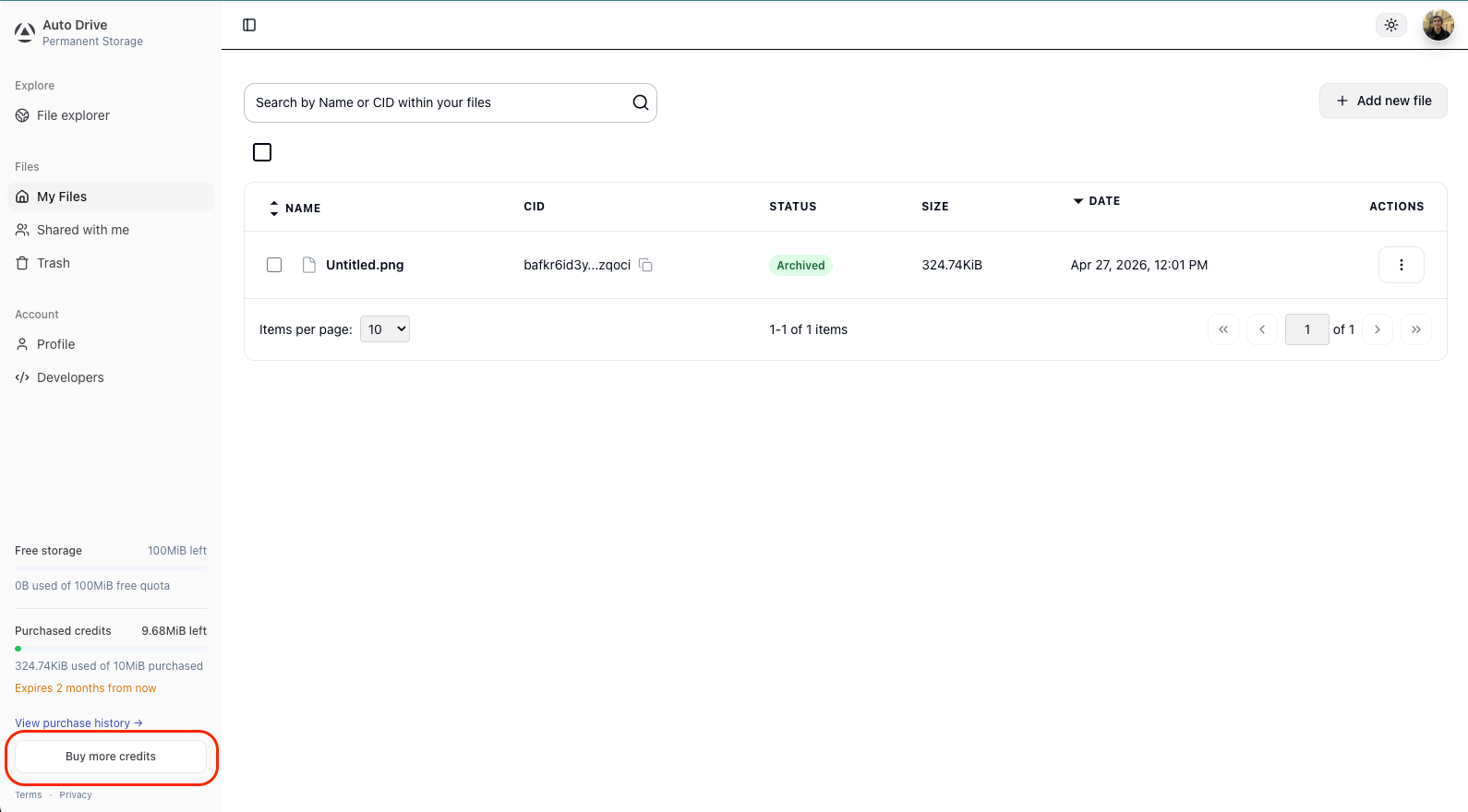
Sign in to ai3.storage via Google and click “Buy more credits” in the bottom-left sidebar of the dashboard.
Google authentication is required, if you’re using GitHub, Discord or a wallet, you will not see the option to purchase credits.
Step 2: Select a Package
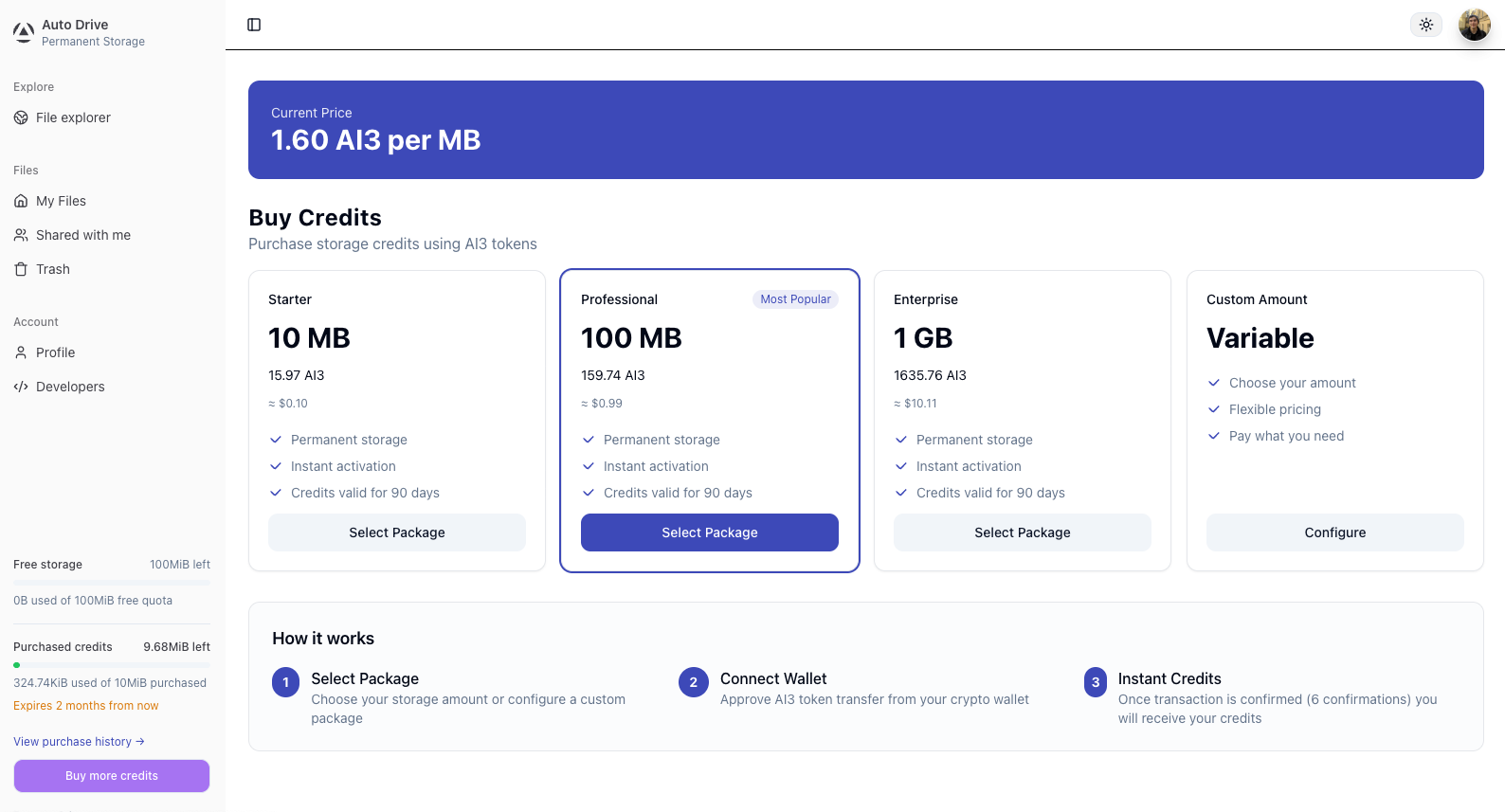
Choose one of the preset packages or configure a custom amount. The current price per MB is shown at the top of the page and is derived from live protocol-level DSN storage costs.
Step 3: Choose USDC and Confirm the Order
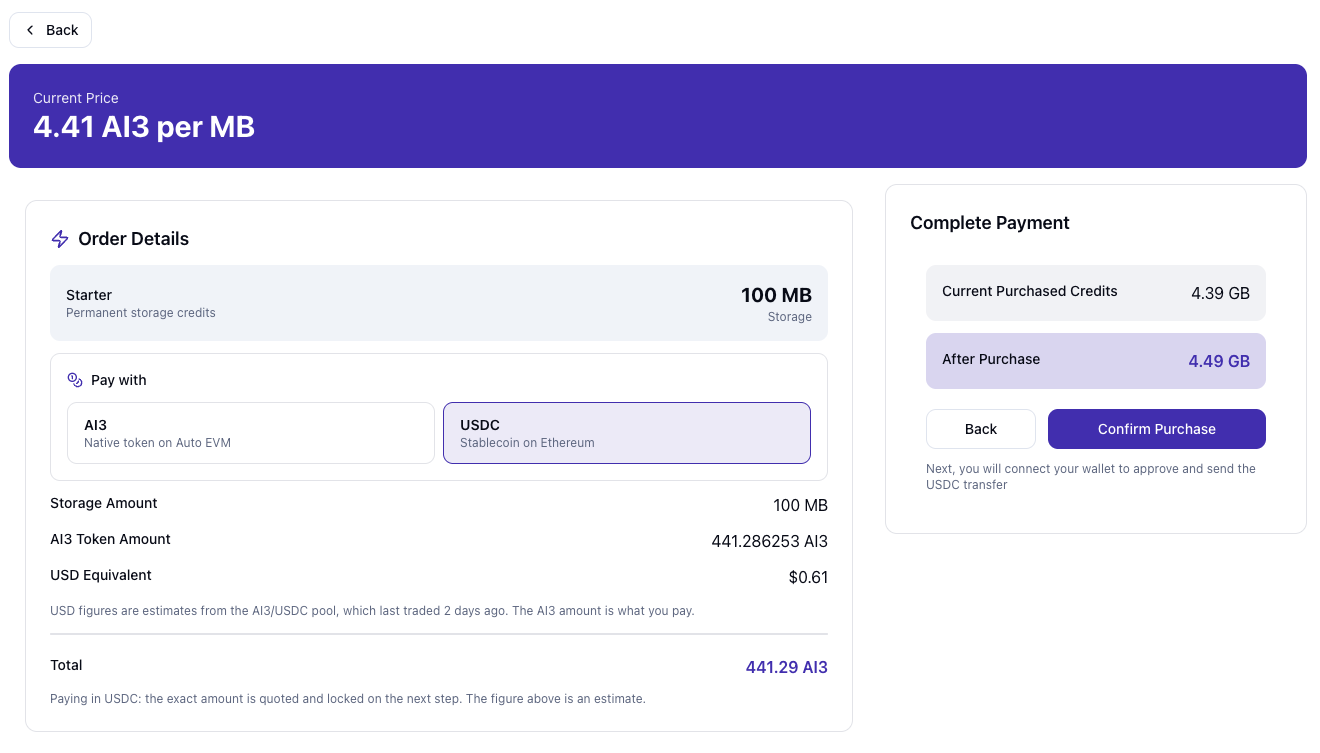
On the order screen, select USDC — Stablecoin on Ethereum as the payment method. Review the order details — storage amount, USD equivalent, and your credits balance before and after purchase. Click “Confirm Purchase” to proceed.
The USD figure on this screen is an estimate. The exact USDC amount is quoted and locked in the next step.
Step 4: Lock the Price, Connect Your Wallet and Pay
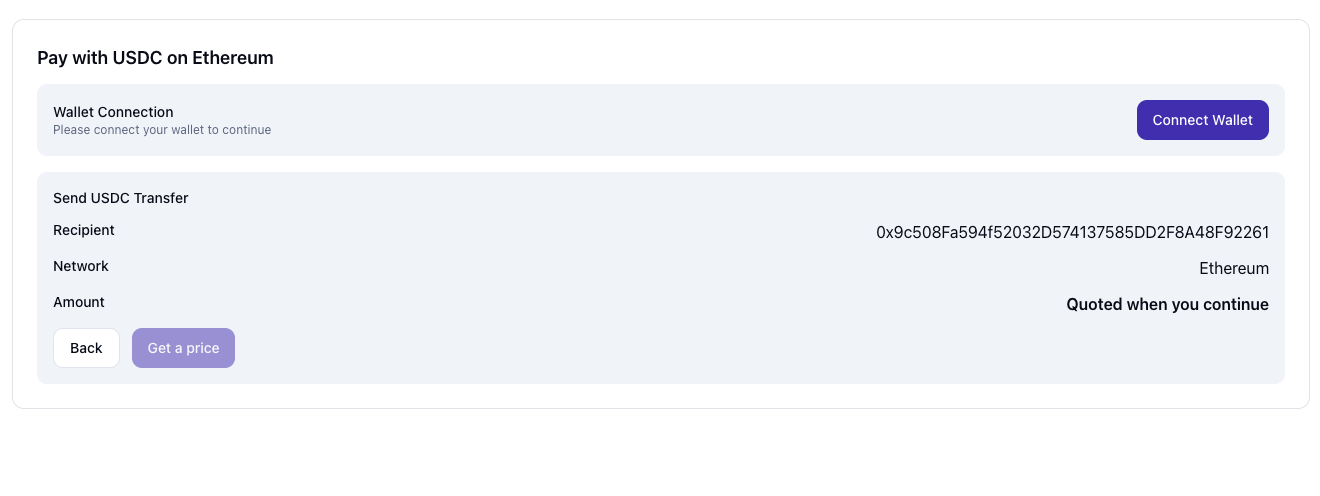
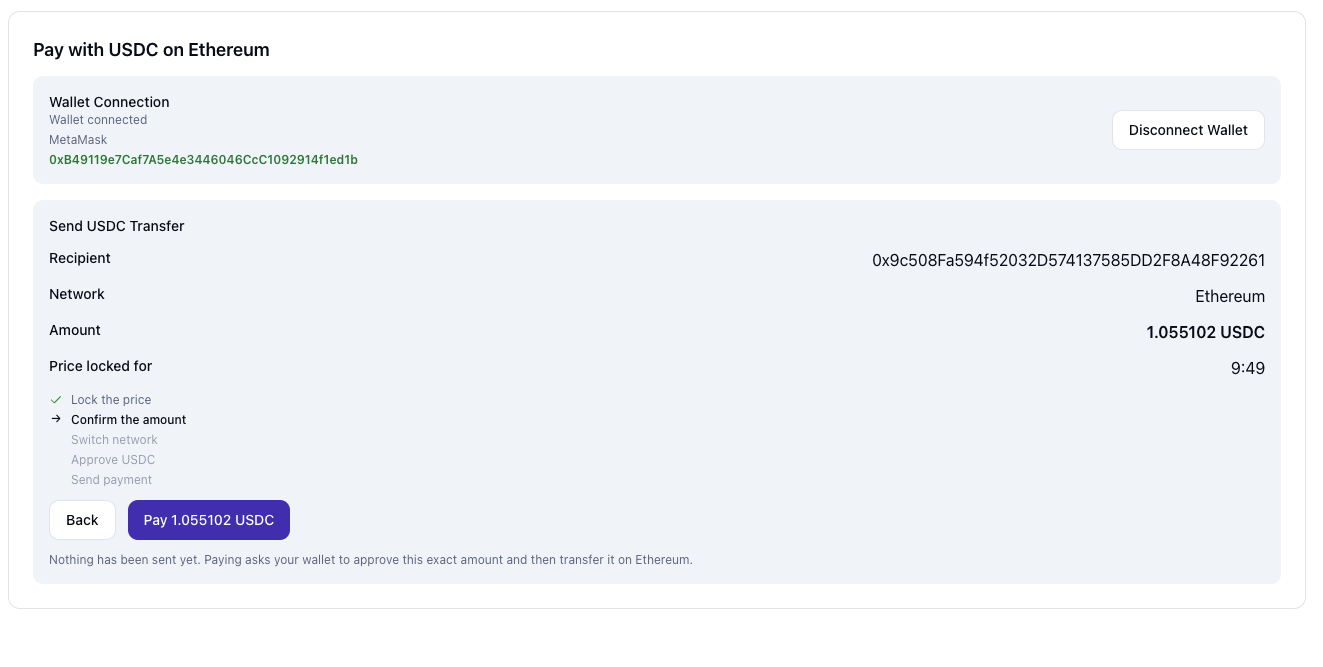
Connect a compatible EVM wallet that holds USDC and ETH on Ethereum mainnet. Click “Get a price” to lock the quote. The screen then shows the recipient contract address and the exact USDC amount to pay.
The price is locked for 10 minutes from this point. Complete the payment within the window. If the timer expires before the payment is sent, click “Get a fresh price” to request a new quote.
Click “Pay amount USDC”. Your wallet will ask you to confirm up to three actions:
- Switch network — if your wallet is not on Ethereum mainnet, confirm the switch.
- Approve USDC — gives the Auto Drive receiver contract permission to spend the quoted amount. Approval does not send USDC yet.
- Send payment — sends the quoted USDC amount to the receiver contract.
Some wallets combine the approval and the payment into a single confirmation.
After sending, the page will show a confirmation progress bar. Wait for all block confirmations before continuing.
Do not pay twice. If the page reloads or your wallet is slow to respond, do not send another payment. The page keeps tracking your payment and resumes when you reconnect the same wallet.
Step 5: Payment Complete
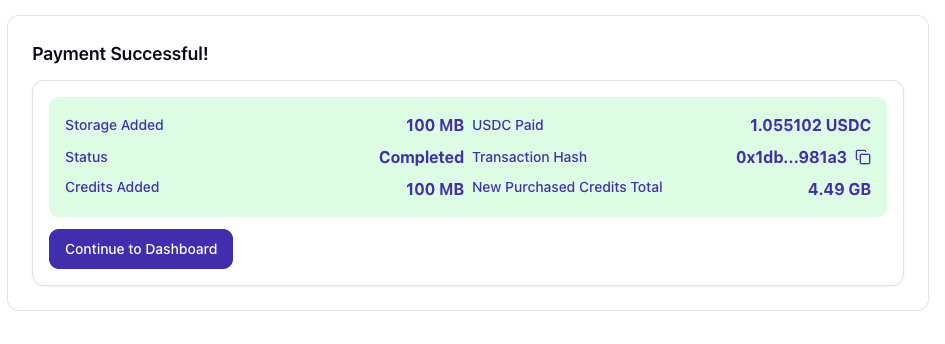
Once all confirmations are reached, you will see a payment receipt showing storage added, USDC paid, transaction hash, and your new purchased credits total. Click “Continue to Dashboard”.
Your credits are immediately available and will be reflected in the sidebar balance. Credits are consumed in FIFO expiry order — credits closest to expiration are spent first.
A Note on Current Limitations
These restrictions are deliberate economic protections, not permanent product decisions. The Autonomys Network is still in its early growth phase, and they exist to prevent storage credit hoarding or speculative accumulation. The goal is for storage credits to be used, not held.
Google authentication is required. Purchasing credits requires signing in with a Google account. Server-side integrations work as long as the owning account authenticated with Google when creating the API key.
100 GB maximum purchased credits per account. This limit applies across AI3 and USDC purchases combined. If a payment would push you past the cap, the intent moves to OVER_CAP — the payment is not lost and is recoverable.
Purchased credits expire after 90 days. Unused bytes are forfeited at expiry. Refunds for unused credits are handled manually through support and are paid in AI3 on Auto EVM (not USDC) to the wallet that made the purchase. Work is underway on automating refunds.
USDC on Ethereum mainnet only. Payments must be made in USDC on Ethereum mainnet, and you pay Ethereum gas fees in ETH for the approval and the payment.
USDC purchases can be paused temporarily. New USDC quotes may be unavailable for short periods, for example when a reliable AI3/USD rate cannot be read. A quote you already locked stays payable for its full 10 minutes. If USDC is unavailable, you can pay with AI3.
Pay within the 10-minute price lock. A payment that arrives shortly after the lock ends can still be credited, but one that arrives too late, or USDC sent to a wrong quote, is not credited automatically. Such payments are recorded and recoverable through support.
These constraints will be revisited as the network matures. If you are building something that these limits add friction to, reach out on the forum or in Discord.
For full details, see the Auto Drive Terms of Use.
Further Reading
- Auto Drive Overview
- Pay with AI3 — purchase storage credits with AI3 tokens on Auto EVM
- Pay with AI3 & USDC — Developer Integration — integrate USDC credit purchasing into your own application
- File Encryption Specification
- Auto Drive SDK